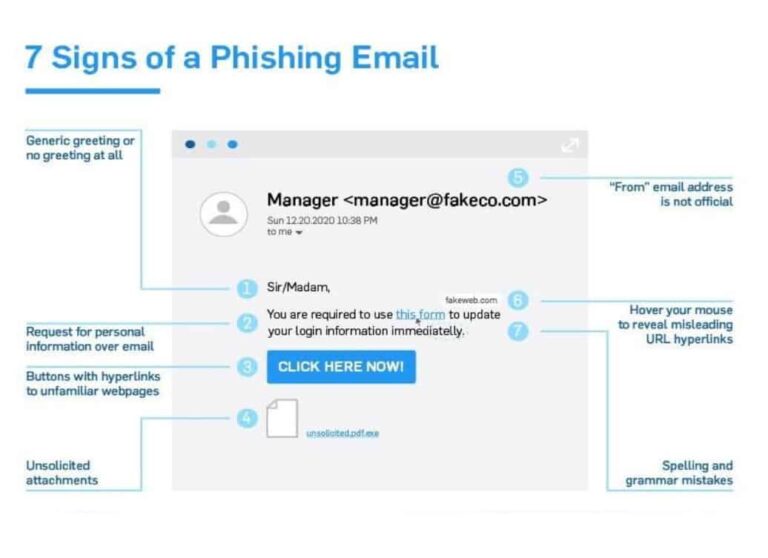
I thought it important to share some key points on how to identify phishing emails. The criminals organising these attacks are getting better at designing what appear to be authentic emails.
Below is a simple diagram that shows the 7 key signs of a bogus email. I always consider point 5 to be the key indicator, the area in the angle brackets is the tell-tale giveaway. The name to the left can easily be faked but the email address is trickier to fake. Look closely at the address to the right of the @ sign they are often from generic accounts with numbers, for example wayne@Amazon412.co.uk
Some more sophisticated attacks may substitute letters for numbers eg. wayne@sk1ll3dt3ch.co.uk
One very popular tactic that is on the increase is to impersonate the head of the company and send a high pressures time sensitive demand. They can go to the lengths of finding out if the boss is on holiday, knowing they would not want to be disturbed with a call to authenticate the email.
Never click on a link asking for your credentials, always go direct to the website from your internet browser.
If you ever have any doubts, please either forward the email to itsupport@skilledtech.co.uk, or even better send it as an attachment.