
In October 2025 Google quietly activated a feature that means you’ve been secretly opted in to a feature that allows the tech giant to access all your private emails.
Why did they do this?
To allow Google to scan their messages and attachments to help train its AI models like Gemini.
In order to stop your data from being used you need to turn off Googles Smart Features in 2 places, as follows:
Online
If you use Gmail through a desktop or laptop, you have to open the ‘See all settings’ tab and choose to turn off the option ‘Turn on smart features in Gmail, Chat, and Meet’ in the section labeled as Smart features.
Then you have to open the ‘Manage Workspace smart feature settings’ located right below the Smart features and opt out of the permissions there before saving your choices.
On a mobile device
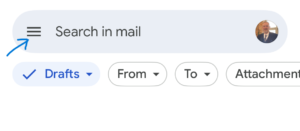
If you access your messages through a smartphone, tap the menu icon, which looks like three lines at the top left of the screen.
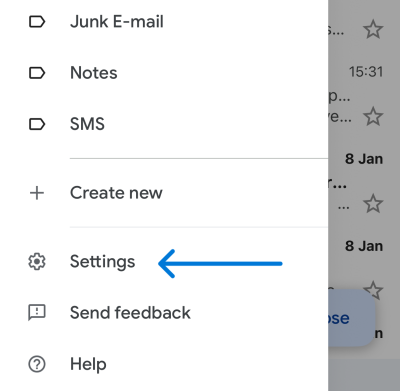
Next, scroll down to the bottom and select ‘Settings,’
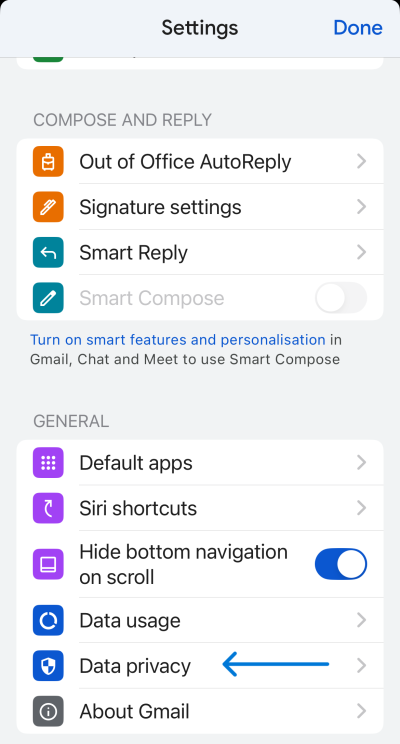
Again scroll all the way to the bottom and then tap ‘Data privacy.’
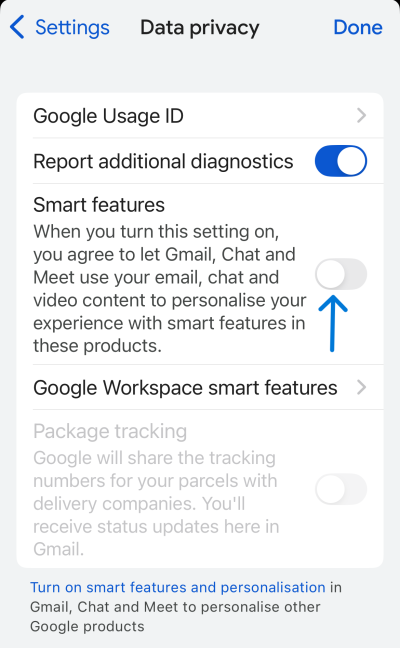
Toggle off ‘Smart features and personalization’
Then tap into ‘Google Workspace smart feature settings’ and turn off the options for Workspace and other Google products.