

What is SPF and why do we need it?
SPF is basically your email domain’s guest list — and the mail servers at the door are checking it like nightclub security.
What is SPF?
SPF (Sender Policy Framework) is a record you publish in your DNS that says:
“Here are the servers that are allowed to send email on behalf of my domain. Anyone else? Kick them out.”
It’s literally a list of approved senders.
So if someone tries to send an email pretending to be you — but from some random server — the receiving system checks your SPF record and goes:
“You’re not on the list. you’re not coming in.”
Why we need SPF
1. It stops spoofing (or at least makes it much harder)
Without SPF, scammers can use your domain to blast out phishing emails.
With SPF, their fake sender server gets flagged as unauthorised.
2. It helps your real emails get delivered
Mail providers love SPF.
If they see you’ve got a proper SPF record, they’re more likely to treat your messages as legit and less likely to put them into spam.
3. It’s required for full authentication
SPF + DKIM + DMARC is the holy trinity of “please don’t send my emails to spam.”
DMARC in particular uses SPF results to make decisions, so without SPF your DMARC setup is basically missing a leg.
4. It helps you keep track of who’s sending what
Whenever you add a new email system — e.g. Microsoft 365, a marketing platform, a ticketing system — you add it to your SPF record.
This stops surprises and keeps your domain tidy.
The takeaway
SPF tells the world which machines are allowed to send mail as you.
Without it, your domain is free real estate for spammers, and your delivery rates suffer.
What is DKIM and why do we need it?
DKIM is basically your email’s “tamper-proof seal.”
What DKIM is (in plain English)
When your system sends an email, it stamps it with a special digital signature — kind of like sealing a letter with a unique wax stamp that only you can make.
When the receiving mail server gets the message, it checks your public “stamp” (stored in DNS) to make sure:
The email really came from you, and
Nobody messed with it on the way.
If the stamp doesn’t match, the receiving system goes, “Nope, someone’s been fiddling with this,” and treats it as dodgy.
Why we need DKIM
Because without it…
Anyone can fake the “From” address.
Messages can be altered in transit and nobody would know.
Modern mail systems (Google, Microsoft, etc.) will start looking at your domain like it has a shady past.
DMARC, which is the upper-most level protection, relies on DKIM to do half its job.
The simple bottom line
DKIM is the proof that your emails are genuinely yours and untouched.
Without it, your emails look like they could be from literally anyone, and mail providers don’t trust that.
It’s one of the main ingredients that keeps your messages out of spam and keeps impersonators from running wild with your domain.
What is DMARC and why do we need it?
What is DMARC?
DMARC is basically the bouncer for your company’s email.
When your organisation sends an email, you want the receiver to know it’s really from you and not from some scammer pretending to be you.
DMARC is a rulebook you publish that tells other mail servers:
-
How to check if an email claiming to be from you is legit
(It uses two older checks behind the scenes: SPF and DKIM.) -
What to do if an email fails those checks
-
Let it through anyway – Not good you don’t want emails not from you arriving in your clients Inbox. Known as p=none
-
Put it in spam – Also not good, yes better than going direct into a clients Inbox but if they check their spam regularly they will still get the email that’s not from you. Known as p=quarantine
-
Or deny/block it – If an email is not genuinely from you then it needs to be denied/blocked so your clients don’t get it. Known as p=reject
-
-
Where to send reports about who’s trying to spoof your domain
So you can see if someone is out there impersonating your brand.
Think of it as:
“Here are my security guards (SPF/DKIM). If someone fails the ID check, here’s how I want you to handle them, and by the way, please send me a daily report.”
So DMARC is a simple but mighty way to stop people sending dodgy emails pretending to be you.
Why do we need it?
Because without DMARC, your email domain is basically a house with the front door wide open and a sign saying, “Please don’t rob me.”
Here’s the easy answer:
1. Stops scammers pretending to be you
Anyone can forge the “From” address on an email. Without DMARC, there’s nothing stopping someone sending fake emails that look like they came from your domain.
DMARC tells receiving servers how to handle fakes, so most of them get blocked or dumped into spam/junk.
If someone sent a fake Invoice to your clients, or even worse they intercepted a genuine Invoice you sent and changed the bank details on that invoice and then sent it on to your client this could result in your client paying someone else. This is not something you want to happen.
2. Protects your brand
If scammers send emails pretending to be you, your company looks unprofessional or — worse — untrustworthy. DMARC helps you avoid that PR nightmare.
3. Improves your email deliverability
Ironically, not having DMARC can make even your real emails look suspicious.
Having DMARC set up correctly makes inbox providers like Microsoft, Google, and everyone else more confident you’re genuine — so your emails land in inboxes instead of spam folders or bouncing back.
4. Gives visibility into what’s happening with your domain
DMARC’s reports show you:
-
who’s sending email from your domain,
-
who’s trying to,
-
and whether your own systems are set up correctly.
You can’t fix what you can’t see.
5. It’s becoming a requirement
Google, Yahoo and Microsoft already expect DMARC from bulk senders. Others will be following soon.
Soon “no DMARC” will be the email equivalent of “no seatbelt”.
In short:
DMARC keeps the bad guys out, keeps your real mail flowing, and stops your domain from becoming a playground for scammers.
7 key signs of a phishing email
I thought it important to share some key points on how to identify phishing emails. The criminals organising these attacks are getting better at designing what appear to be authentic emails.
Below is a simple diagram that shows the 7 key signs of a bogus email. I always consider point 5 to be the key indicator, the area in the angle brackets is the tell-tale giveaway. The name to the left can easily be faked but the email address is trickier to fake. Look closely at the address to the right of the @ sign they are often from generic accounts with numbers, for example wayne@Amazon412.co.uk
Some more sophisticated attacks may substitute letters for numbers eg. wayne@sk1ll3dt3ch.co.uk
One very popular tactic that is on the increase is to impersonate the head of the company and send a high pressures time sensitive demand. They can go to the lengths of finding out if the boss is on holiday, knowing they would not want to be disturbed with a call to authenticate the email.
Never click on a link asking for your credentials, always go direct to the website from your internet browser.
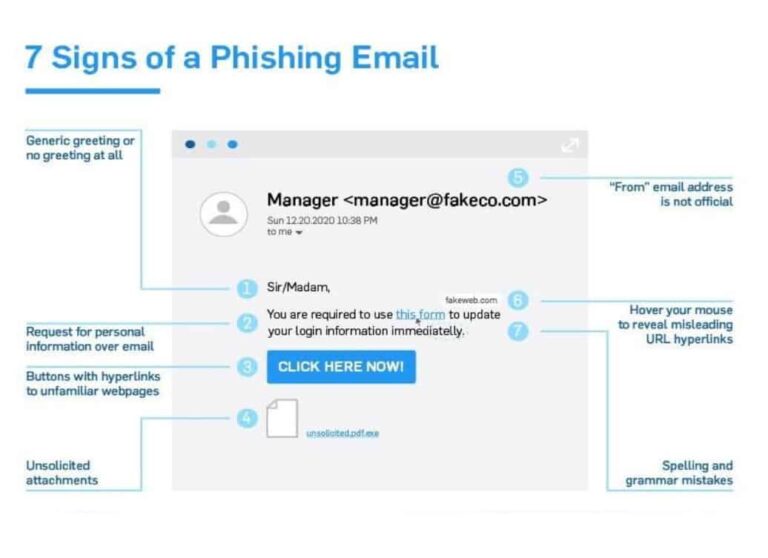
If you ever have any doubts, please either forward the email to itsupport@skilledtech.co.uk, or even better send it as an attachment.